Skip to content
  • 1 on 1 Training
  • Youtube Tutorials
  • Contact Us
  • Game Design
Prespa light mode logo Prespa dark mode logo
Santos Says

Lesson plans and Tutorials for Art, Technology and more!

  • 1 on 1 Training
  • Youtube Tutorials
  • Contact Us
  • Game Design
Home / Coding / 26. Enemy Node Practice – Enemy character in Godot
Coding Game Design Godot

26. Enemy Node Practice – Enemy character in Godot

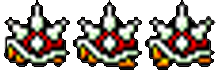
We will create an Enemy node and use our previous Game Over Node to make it work!
We will add an animation to the enemy as well.

Turn in a video of your player touching a animated Enemy and the Game restarting.

enemy_spriteDownload
Clean Up and Enemy NodesDownload

Related

Basic Game Design, character design, coding, Godot, video game design

Posts navigation

< 25 – Game Over Node – Creating a Game Over trigger in Godot
27. Enemy Design – Unique Enemy Characters in Godot >

Related Posts

Image Placeholder
3D design Design Game Design
23 – Blender UV Map and Boolean
Image Placeholder
Coding Game Design Godot
42. Game Folder Backup
Image Placeholder
Coding Design Game Design Godot Sound Design
41. Portals, Levels and Win Screen
Designed by Nasio Themes || Powered by WordPress